
Generative AI for Node-Based Shaders
Ahmad Erfani Jahanbakhsh
Supervised by Prof. Perttu Hämäläinen
Aalto University
November 2024
Abstract
Artificial intelligence (AI) and machine learning are revolutionizing software applications across industries. In image editing, Adobe Photoshop now leverages Firefly generative AI, while in software development, GitHub Copilot enhances code quality and productivity. The game development sector, however, has yet to fully harness AI's potential, particularly in node-based systems for shader creation.
Node-based systems enable developers to create shaders, visual effects, and complex systems including animations, procedural textures, and game mechanics. Rather than writing code manually, developers can utilize predefined code blocks to achieve desired results. However, establishing the foundational structure of node-based systems remains a complex and time-intensive process.
Key Innovation
This thesis investigates the application of advanced language models – specifically Google's Gemini 1.5 and OpenAI's GPT-4 – in developing a generative AI system for node-based shaders. Through the implementation of prompt engineering, retrieval-augmented generation, and fine-tuning techniques, we propose an AI-assisted shader graph system.
Core Features
- Natural language to shader graph conversion
- Automated node generation and connection
- Flexible integration of language models (currently Gemini 1.5 and GPT-4)
- Integration with Unity's Shader Graph system
System Architecture
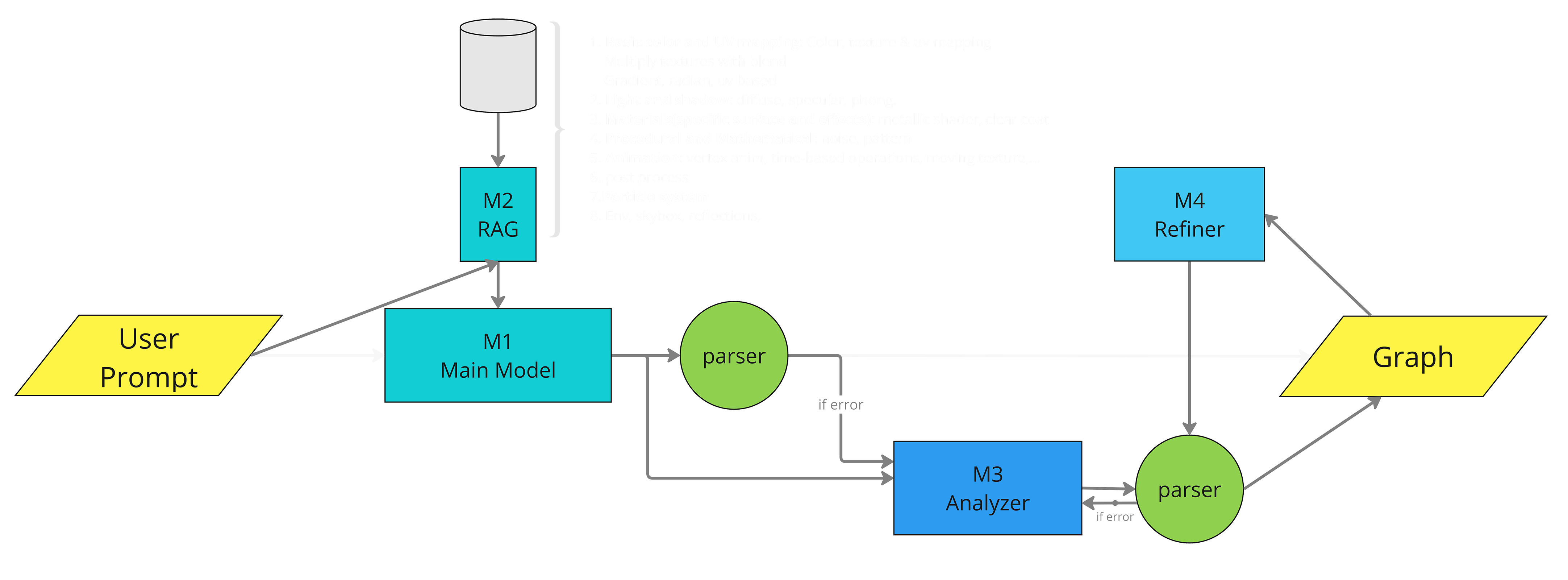
Our AI generation process primarily relies on prompt engineering. To evaluate system performance, we tested two language models: OpenAI's GPT-4 and Google's Gemini. The recently introduced Gemini model (1.5 Pro) boasts a capacity to handle 1 million tokens, allowing for the inclusion of all prompts and examples in a single request. For the GPT model, we implemented a modular Retrieval-Augmented Generation (RAG) system designed to retrieve relevant examples based on user prompts, addressing GPT's token limitations.
The system offers multiple pathways and integrates additional AI models when necessary to assist and assess generated code. This modular approach allows users to activate or deactivate these helpers based on their specific requirements.
Getting Started
1. Obtain API Keys
- Acquire your OpenAI API key from the OpenAI platform
- Get your Gemini API key from the Gemini platform
- Within Unity, set these keys in the Project Settings: Edit > Project Settings > AI Shader
2. Install Python Packages
Open Unity's Python terminal: Edit > Project Settings > Python Scripting > Open Shell Environment
3. Open AI Command Window
- Navigate to Window > AI Shader
- For optimal layout, load the "AI_layout.wlt" file from the layout dropdown
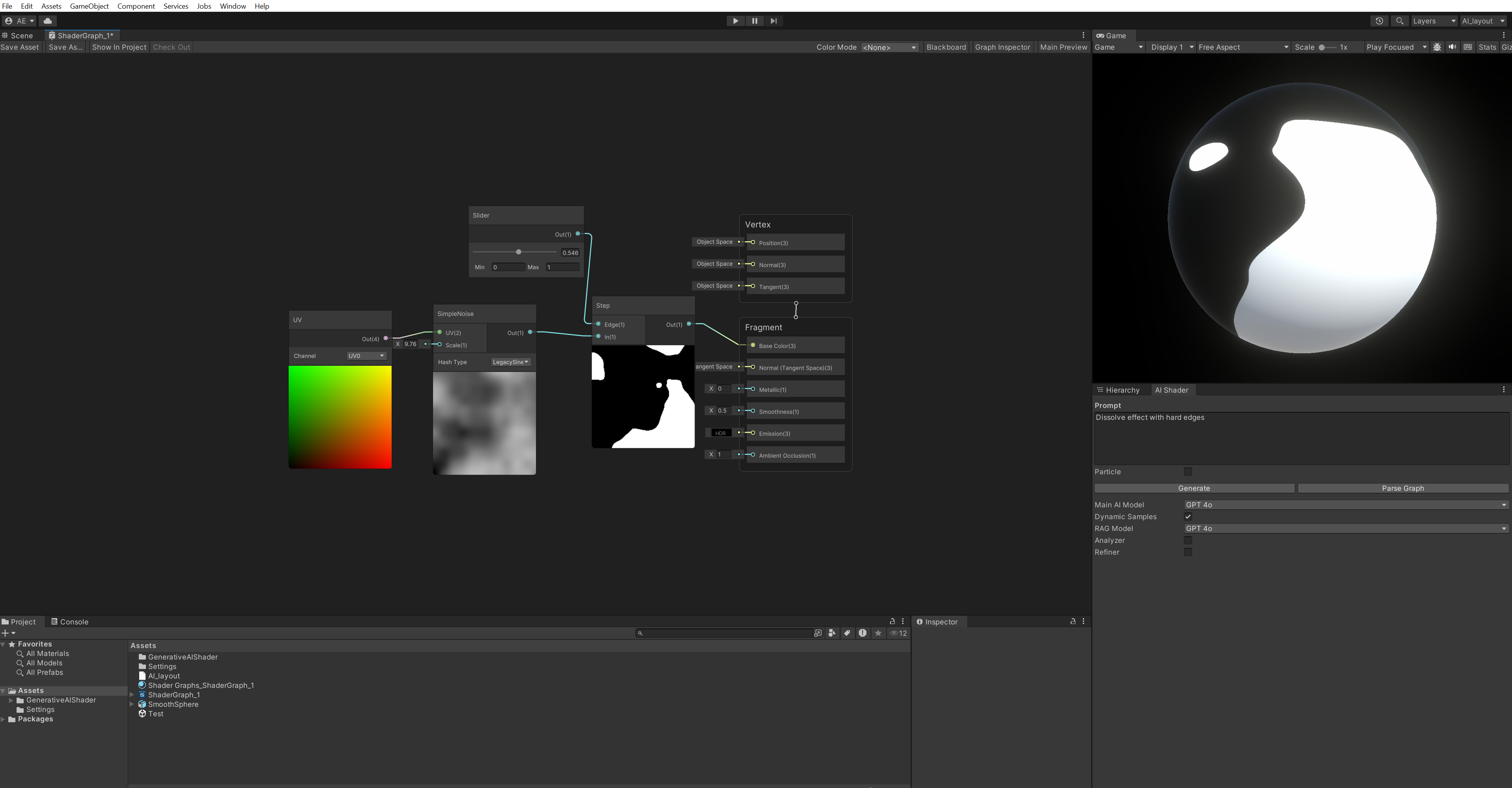
4. Generate Shader Graph
- In the AI Shader window, describe your desired shader effect
- Adjust settings as needed
- Click "Generate"
- If successful, you'll see "Generated successfully; press 'Parse Graph'"
- Click "Parse Graph". The graph is copied to your clipboard
- Paste the graph into the Shader Graph window
Download & Access
You can download the Unity package or the thesis document using the buttons below:
To access the GitHub repository, please email me at: ahmaderfani12@gmail.com